


Why Migrating Your Reviews to Google Business Is a Good Idea (and How to Do It)

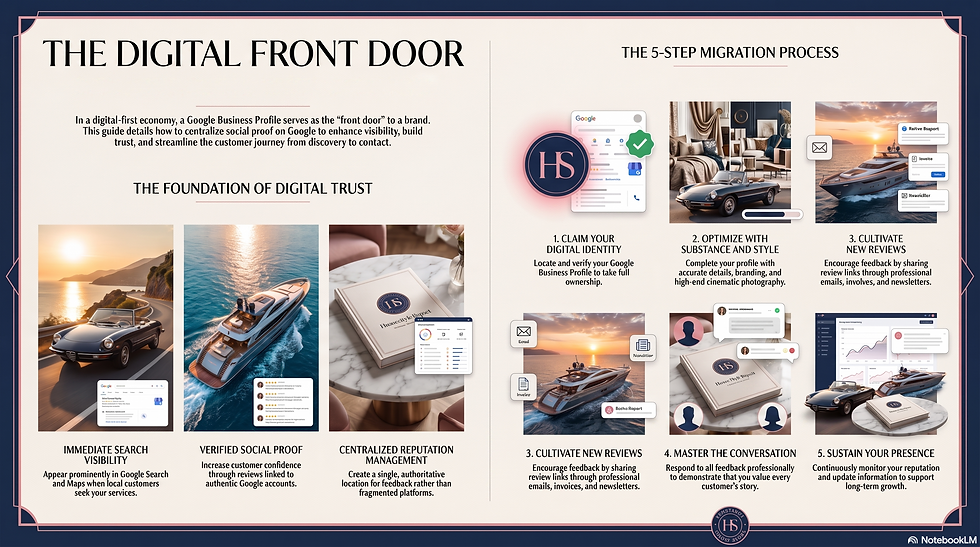
Customer reviews are one of the most valuable assets a business can build. They provide social proof, help new customers make decisions, and demonstrate trust and credibility. Migrating your existing reviews to your Google Business Profile can help increase your visibility, strengthen your online reputation, and make it easier for potential customers to discover and choose your business.
Google is often the first place people search when looking for a local business, service or product. Having reviews displayed directly on your Google Business Profile means customers can immediately see feedback while searching on Google Search or Google Maps. This reduces the number of steps a customer needs to take before deciding to contact or visit you.
Google reviews can also improve your local search performance. Businesses with strong review profiles are more likely to appear prominently in local search results, especially when customers search for services nearby. Regular reviews, recent feedback and positive ratings can all contribute to a stronger online presence.
Moving reviews onto Google also creates a more centralised reputation system. Instead of customers finding reviews across different platforms, Google becomes the main place where your reputation is visible. This makes it easier to manage feedback, respond to customers and monitor how people perceive your business.
Another benefit is increased customer confidence. Many people trust reviews from Google because they are connected to real Google accounts and appear alongside business information such as opening hours, location, photos and contact details. A strong Google review profile can reassure new customers that your business is active, reliable and valued by others.
Step-by-Step: How to Move Your Reviews to Google Business
Step 1: Set up or claim your Google Business Profile
Go to Google Business Profile.
Sign in using your business Google account.
Search for your business name.
If your business appears, select “Claim this business”.
If it does not appear, choose “Add your business” and complete the details.
Step 2: Complete and optimise your profileAdd accurate information including:
Business name
Address or service area
Phone number
Website
Opening hours
Business category
Photos and branding
A complete profile looks more professional and makes customers more likely to leave reviews.
Step 3: Encourage customers to leave new Google reviewsGoogle does not normally allow businesses to simply upload or import reviews from another platform. Instead, ask existing customers to leave their feedback directly on your Google Business Profile.
You can:
Share your Google review link by email
Add the link to invoices or receipts
Include it in newsletters
Send a follow-up message after a purchase or service
Step 4: Respond to existing and new reviewsReply professionally to all feedback. Thank customers for positive reviews and address any concerns raised in negative reviews. This shows that you value customer opinions.
Step 5: Continue managing your reputationRegularly monitor your Google Business Profile, update information and encourage genuine reviews over time. Building a strong Google review presence is an ongoing process that supports long-term growth and customer trust.



Comments